


Making Tax Digital (MTD) is changing how UK businesses, including sole traders, landlords, and small business owners, manage their tax records. Under MTD, you must keep all your income and expenses in digital format using HMRC-approved software. This means saying goodbye to paper records and ensuring everything is stored electronically. Your software will need to track rental income, allowable expenses, and any other adjustments, making it easier for you to stay compliant with HM Revenue & Customs (HMRC) and submit accurate tax returns.
Your software must also generate quarterly updates to HMRC automatically, removing the need for manual input. If you use multiple tools, they must be digitally linked, ensuring smooth data transfer. While you’ll still need to keep receipts and invoices, the core tax records must be digital to meet MTD requirements and avoid penalties. Proper digital recordkeeping will help you stay compliant as MTD becomes mandatory for more landlords and businesses in the coming years.
What Exactly does Digital Recordkeeping involve under Making Tax Digital?
Digital recordkeeping under Making Tax Digital goes beyond simply storing documents on your computer. HMRC has specific rules about how you must record, store, and submit your business financial information electronically.
The Essential Requirement: Functional Compatible Software
The fundamental requirement of MTD is using functional compatible software. This means software that performs three crucial functions:
- Recording and preserving your digital records in electronic format. This isn't just typing numbers into a computer; the software must properly structure and store your financial data
- Sending quarterly updates and end of year statements directly to HMRC through their API platform. This technical system receives your digital submissions automatically. You don't need to understand the technical details, but your software must connect to it
- Receiving information back from HMRC about your compliance. This two-way communication keeps you informed about your obligations
What Information Must Your Digital Records Include?
HMRC specifies exactly what information your digital records must contain. These requirements ensure consistency and make submitting accurate tax information easier
For Making Tax Digital (MTD) compliance, your digital records must include key business details. These include your business name, trading name (if different), and business address. You'll also need to provide your Unique Taxpayer Reference (UTR) and National Insurance number.
If you use any special accounting schemes, such as Cash Basis or Traditional Accounting, these should be recorded. For VAT registered businesses, include your VAT registration number and details of any VAT schemes, like the Flat Rate Scheme. Keeping these details accurate in your digital records is essential for HMRC compliance under MTD.
Why Categorisation Matters?
Getting categorisation right is crucial. Categories you use in digital records flow through to quarterly updates and ultimately your tax return. Miscategorising expenses might mean claiming expenses that aren't allowable or failing to claim expenses you're entitled to.
Most accounting software makes categorisation straightforward. When recording transactions, simply select the appropriate category from a dropdown list. The software remembers your choices, so regular expenses like monthly rent or insurance can be categorised automatically.
To learn more about this topic you can check out this blog.
Digital Links: The Unbroken Chain Requirement
One of the most important MTD requirements is maintaining digital links. This means once transaction data enters your digital system, it must remain digital all the way through to your HMRC submission. No manual copying, retyping, or transcribing is allowed.
Valid digital links include automatic bank transactions feeding directly into your accounting software through electronic bank feeds or using formulas in spreadsheet cells (e.g., =SUM (A1:A10)) to link data. Additionally, software integrations that allow data to flow automatically between different programmes and accounting software that calculates totals directly from transaction records are also considered valid.
Using these tools eliminates manual data entry, reducing errors and ensuring your records are accurate.
Why are digital links required?
Digital links are essential under HMRC’s Making Tax Digital (MTD) rules for a few key reasons. They help eliminate transcription errors that happen with manual data entry, making your records more accurate. Digital links ensure the figures sent to HMRC match your actual records, reducing the chance of mistakes. They are also a crucial part of the MTD process, helping businesses stay compliant and making tax reporting easier.
What breaks a digital link?
Breaking a digital link can occur in a few ways. Copying and pasting figures between systems or manually typing numbers into spreadsheets or tax software both disrupt the link. Similarly, printing reports and entering data by hand elsewhere also breaks the chain. These actions can lead to errors and affect MTD compliance.
Can You Use Spreadsheets for MTD?
Yes, you can use spreadsheets with important conditions. You must use formulas to calculate figures automatically. For example, totalling monthly expenses requires a SUM formula rather than typing the total.
You will also need bridging software to connect your spreadsheets to HMRC systems. Bridging software reads data from your spreadsheets and submits it to HMRC in the required format, maintaining the digital link between your records and HMRC submission.
However, many people find proper accounting software easier and more reliable than maintaining spreadsheets with formulas and bridging software. Accounting software offers features spreadsheets do not, such as automatic bank feeds, receipt capture apps, and built-in error checking.
When Must You Create Digital Records?
Under Making Tax Digital (MTD), you must keep digital records throughout the year and not leave everything until the end of the quarter. HMRC does not give an exact number of days for recording each transaction, but your records must be up to date when you prepare and submit your quarterly update. This means all income and expenses for the period must already be recorded in your digital system before submission.
In practice, you should enter transactions regularly, such as weekly or fortnightly, rather than waiting until the last minute. This helps ensure your quarterly updates are accurate and reduces the risk of errors.
Under MTD, you must submit quarterly updates to HMRC showing income and expenses for each three-month period.
What Goes in Quarterly Updates?
Quarterly updates require providing totals of income by category for that quarter, with software calculating these totals from your digital records automatically, totals of expenses by category for that quarter coming straight from your digital records, and basic business information like your name, UTR (Unique taxpayer reference), and property details if you're a landlord.
Quarterly updates are not mini tax returns. You are not calculating tax or claiming reliefs at this stage. You're simply reporting income and expenses in summary form.
When Are Quarterly Updates Due?
Standard quarterly periods and deadlines
Quarter | Standard Update Period | Calendar Update Period | Submit By |
|---|---|---|---|
Quarter 1 | 6 April to 5 July | 1 April to 30 June | 7 August |
Quarter 2 | 6 July to 5 October | 1 July to 30 September | 7 November |
Quarter 3 | 6 October to 5 January | 1 October to 31 December | 7 February |
Quarter 4 | 6 January to 5 April | 1 January to 31 March | 7 May |
If you prefer calendar based periods for your MTD quarterly updates, activate this option in your software before submitting the first update of the tax year. Once set, it will apply for the entire year unless changed before the next tax year begins. This ensures your updates align with calendar months instead of standard tax periods.
How to correct an error in a quarterly update?
If you discover an error in a quarterly update, you've already submitted, don't panic. You can correct it when submitting your next quarterly update or in your end of year statement. The system is designed to let you adjust as you go.
What are the End of Year Statement requirements under Making Tax Digital (MTD)?
After completing four quarterly updates, you must submit an end of year statement. This is more detailed than quarterly updates and includes summary totals of income and expenses for the whole year, any adjustments you need to make like Capital Allowances or pension contributions, details of any losses you want to carry forward, claims for reliefs and allowances, and a declaration that the information is correct and complete to the best of your knowledge.
The end of year statement is due by 31 January following the end of the tax year, the same deadline as your self-assessment tax return.
If you want to know more about final declaration or end of year statement requirements ,you can read this blog.
Similarities with Self Assessment
MTD does not replace self assessment tax returns completely. You still file your normal tax return, but quarterly updates and end of year statements feed information into it. Your tax return includes MTD business and property information automatically. You'll then add other income sources like employment, pensions, investments, and savings interest, and claim additional reliefs or allowances.
How Long Do You Need to Keep Digital Tax Records for MTD Compliance?
Requirement | Duration | Details |
|---|---|---|
Income Tax Records | 5 years after 31 January deadline | Keep records for 5 years after the 31 January deadline following the end of the tax year. |
VAT Records | 6 years | For VAT registered businesses, VAT records must be kept for 6 years. |
Accessibility of Records | Ongoing during retention period | Records must remain accessible in case HMRC requests them. |
Secure Storage | Ongoing during retention period | Records must be stored securely to protect confidential business information. |
Simplified Recordkeeping Options
HMRC offers simplifications reducing digital recordkeeping burden for certain businesses.
What Digital Recordkeeping Doesn't Require?
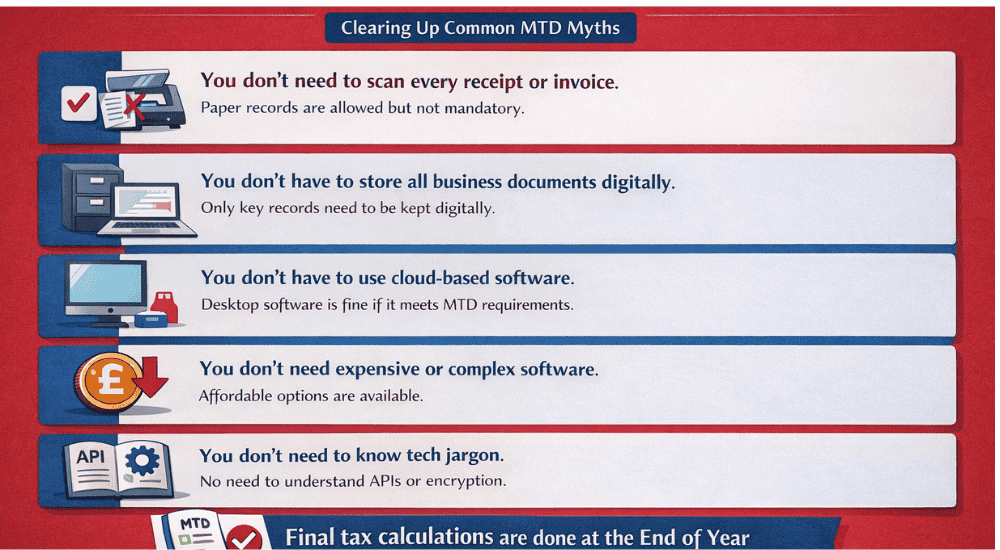
Under Making Tax Digital (MTD), businesses don’t need to scan every receipt or invoice; paper records are fine if they are stored digitally. Only key records need to be kept electronically, and cloud-based software isn’t mandatory desktop software can also meet MTD requirements. There are affordable software options available, and you don’t need to worry about technical terms like APIs or encryption. Understanding these points helps make MTD compliance simpler and more manageable.
What Are the Common Mistakes to Avoid in Digital Recordkeeping for HMRC Compliance?
Here are the common mistakes to avoid in digital recordkeeping for HMRC compliance
If digital recordkeeping feels overwhelming, Rental Bux is here to help. Their platform is tailored for property owners and investors, offering easy to use tools to stay compliant with HMRC’s Making Tax Digital (MTD) requirements.
Rental Bux makes it simple to set up the right software, track rental income and expenses, and submit your quarterly updates and end of year declarations directly to HMRC using HMRC approved software.
With straightforward workflows and expert support, you’ll stay on top of your records and MTD reporting with ease whether you're just starting or need help along the way.
What Are the Penalties for Not Meeting MTD Requirements?
If you fail to comply with HMRC’s Making Tax Digital (MTD) regulations, several penalties could be imposed. Here’s a breakdown of the penalties you might face:
Issue | Penalty / Explanation |
|---|---|
Late Quarterly Submissions | HMRC issues penalty points for each late quarterly submission. Once you reach the points threshold, a financial penalty (typically £200) will be charged for each subsequent late submission. |
Late End-of-Year Submissions | Penalty points are also applied to End of Period Statements and Final Declarations if they are submitted late. |
Failure to Keep Proper Digital Records | If you fail to maintain proper digital records or use compliant software, HMRC can charge penalties up to £3,000. |
Deliberate Errors or Falsified Records | Serious penalties apply if you deliberately falsify records or withhold information, leading to higher fines and possible further action. |
HMRC will notify you when penalty points are issued, so you can address the issue before financial penalties apply. Penalty points expire after a period of consistent compliance. Timely submissions help clear penalty points and avoid further penalties.
Conclusion
Making Tax Digital (MTD) is transforming recordkeeping by replacing outdated paper-based systems with efficient digital ones. Although it may feel overwhelming initially, MTD’s goal is to make tax reporting more accurate, faster and easier to manage. The main requirements are simple: use MTD-compatible software, categorise income and expenses correctly, maintain digital links, submit quarterly updates on time, and store records for the required period.
With the right software and good recordkeeping habits, digital systems quickly become more efficient than traditional methods. To ensure a smooth transition, it’s best to prepare early by selecting the right software, setting it up properly, and keeping records regularly. If you’re unsure about any step, professional advice can help. Once everything is in place, compliance becomes easier, and your financial management improves over time. MTD not only keeps you compliant but also makes managing your finances more organised and efficient.
Frequently Asked Questions (FAQs)
Digital recordkeeping under MTD means storing income, expenses, and other financial data in HMRC-approved software rather than paper records. These digital records must be submitted to HMRC for quarterly updates and the end-of-year declaration.
From April 2026, landlords and sole traders earning over £50,000 must use MTD-compatible software. This threshold will lower to £30,000 by April 2027 and £20,000 later.
Digital records must be stored using functional software and include details like income, expenses, and business information (e.g., UTR). Supporting documents can be scanned or photographed, but core data must be electronic.
Yes, you can use spreadsheets with formulas and bridging software to link them to HMRC. Manual data entry or unlinked spreadsheets won’t meet MTD requirements.
You must submit quarterly updates under MTD using your software, reporting income and expenses. These updates are due after each 3-month period and help HMRC track your progress.
Need Help?
Need more expert advice on Requirements of Digital Recordkeeping?

- The VAT Payment Methods HMRC Actually Accepts - 11 September 2026
- The Rise of Americans Moving & Renting in the UK: What UK landlords Must Check - 4 September 2026
- HMRC Automatic Making Tax Digital Sign Up For Landlords & Sole Traders - 2 September 2026
